AMXX Welcome Effects Plugin – Counter-Strike 1.6
Welcome Effects Plugin – Counter-Strike 1.6 Version Update: 29/11/2024 Enhances the player expe
Description & Documentation
Welcome Effects Plugin – Counter-Strike 1.6
Version Update: 29/11/2024
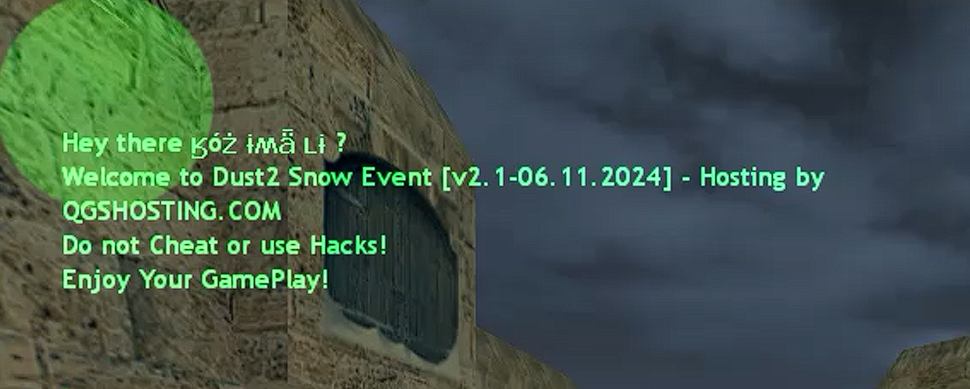
Enhances the player experience by combining music, visual effects, and personalized HUD messages when a player joins your server.
✅ Overview
Welcome Effects is a highly customizable AMX Mod X plugin designed to create an immersive and engaging entrance for each player. The plugin integrates:
Background music playback
Synchronized screen flashes
Thunder sound effects
Personalized HUD welcome messages
🔹 Features
Background Music: Custom MP3 plays on player join
Visual Effects: Screen flashes synchronized with music
Sound Effects: Thunder sounds at configurable intervals
Welcome Message: Personalized HUD message showing player name and server name
Fully Configurable: All effects and timings adjustable via config file
⚙️ Requirements
AMX Mod X 1.10.0+
ReAPI module
Counter-Strike 1.6 server
💾 Installation
Copy welcome_effects.amxx to addons/amxmodx/plugins/
Create directory cstrike/sound/GMSMusic/
Place your welcome music file as newwelcome.mp3 in sound/GMSMusic/
Add welcome_effects.amxx to plugins.ini
The config file is automatically created at addons/amxmodx/configs/welcome_effects.cfg
⚙️ Configuration
Config File: addons/amxmodx/configs/welcome_effects.cfg
// Path to welcome music file
we_music_path "GMSMusic/newwelcome.mp3"
// Path to thunder sound
we_thunder_path "ambience/thunder_clap.wav"
// Duration of welcome effects in seconds
we_effects_duration "7.0"
// Number of screen flashes
we_flash_count "21"
// Number of thunder sounds
we_thunder_count "5"
// Alpha transparency of screen flashes (0-255)
we_flash_alpha "230"
🎬 Effect Sequence
When a player joins:
Welcome music starts playing
Screen flashes (default: 21 flashes over 7 seconds)
Thunder sounds play at configurable intervals (default: 5 times)
HUD welcome message appears after effects finish
🔧 Technical Details
Welcome Music
Format: MP3
Default path: sound/GMSMusic/newwelcome.mp3
Duration should match the total effects duration
Screen Effects:
Black screen flashes with configurable alpha
Dynamic timing based on total effect duration
Synchronized with thunder sounds
Thunder Effects
Uses ambience/thunder_clap.wav by default
Evenly distributed across effect duration
Configurable number of repetitions
HUD Welcome Message:
Displays player name and server name
Green/Yellow color scheme
Position: Upper-left corner (X: 0.05, Y: 0.13)
Duration: 12 seconds, Fade: 6 seconds
This plugin creates a high-impact, immersive welcome experience, enhancing first impressions and engagement for players joining your CS 1.6 server.
Verified Archive Contents
CS 1.6 File Validator VerifiedCustomer Reviews & Comments (0)
Please log in to leave a rating or review for this resource.
Log In to Rate / ReviewCreator Information

HostMods Official Studio
Verified CS 1.6 PublisherOfficial high-performance CS 1.6 game modes, optimized AMXX 1.10 plugins, and competitive anti-cheat modules by HostMods Engineering.
View Seller Store