AMXX Player Models Menu
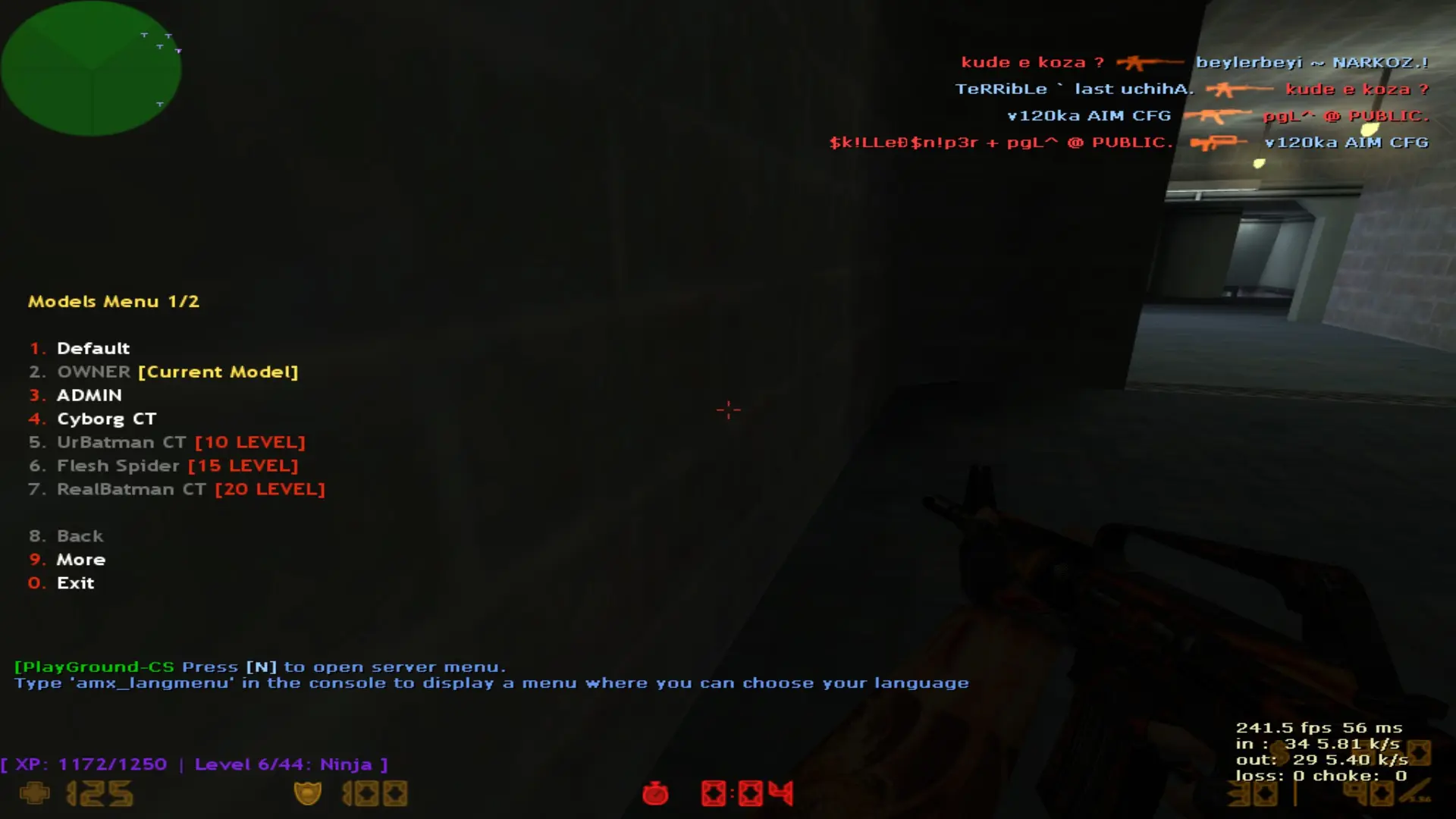
The Player Models Menu (v2.1 – ReAPI) plugin provides players with the ability to select custom
Description & Documentation
The Player Models Menu (v2.1 – ReAPI) plugin provides players with the ability to select custom player models directly in-game. Server administrators can control model access through admin flags, team restrictions, and rank systems such as CRXRanks, Oxci Rank System, and Tornado Ultimate Rank System.
The plugin is designed for performance, flexibility, and compatibility. It works standalone and does not require any additional systems to function.
✨ Features
📌 Model Selection Menu
Players can open a model menu using:
/models (chat command)
amx_models (console command)
The menu displays:
All available models
Model access requirements
Which model the player is currently using
🔐 Admin Control
Each model can be restricted by:
Admin flag (e.g., t, l, d, etc.)
Only players with the required admin flag will see or use the restricted model.
📊 Access Level Control
Supports level-based restrictions using:
CRXRanks
Oxci Rank System
Tornado Ultimate Rank System
You can define a minimum level for each model.
👥 Team-Specific Models
Models can be restricted to:
Terrorists (1)
Counter-Terrorists (2)
Both teams (0)
Players will only see models available to their team.
📁 Configurable Through models_menu.ini
Models and their access rules are fully configurable using a simple syntax:
"Display Name" "Model File Name" "Team" "Admin Flag" "Access Level"
Examples:
CT Admin Skin:
"OWNER" "guts_owner_ct" "2" "l" "1"
T Admin Skin:
"OWNER" "guts_owner_te" "1" "l" "1"
📦 Model File Structure
Each model must be placed inside its own directory matching the model name.
Example structure:
cstrike/models/players/admin_drago/admin_drago.mdl
✔ Directory name = model name
✔ File name = identical to the directory
This ensures the plugin can load models correctly.
⚙️ Implementation Details
Uses ReAPI for optimized performance.
Hooks into the player spawn event to apply selected models.
Verifies:
Player team
Admin status
Rank level
Model availability
Automatically loads:
All models from models_menu.ini
Team restrictions
Access rules
Dynamically builds and updates the player menu based on available models.
🛡 Error Handling
The plugin includes robust error checking:
Missing configuration file → plugin pauses and notifies the server.
Incorrect model folder → warning message.
Failed model precaching → model disabled with an error notice.
📘 Notes:
Fully documented code with clear comments.
Lightweight and optimized for large servers.
Designed for flexibility with multiple rank systems.
Works standalone with no additional plugins required.
Verified Archive Contents
CS 1.6 File Validator VerifiedCustomer Reviews & Comments (0)
Please log in to leave a rating or review for this resource.
Log In to Rate / ReviewCreator Information

GameMods-Servers Studio
Verified CS 1.6 PublisherOfficial GameMods-Servers Studio. High performance AMX Mod X plugins, C++ binary modules, and turnkey CS 1.6 & CS2 game server systems.
View Seller Store